


The Side Panel Press
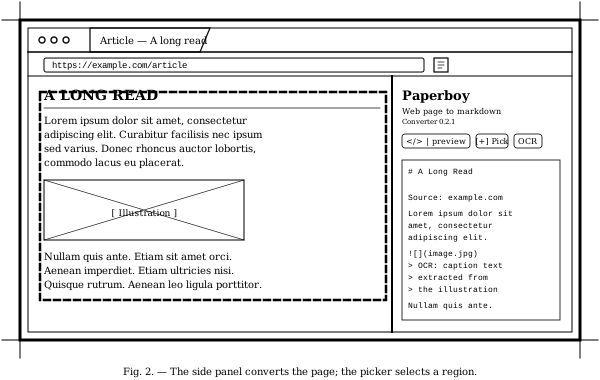
The Chrome extension operates from a side panel — quiet, out of the way, and ready the moment a page needs stripping down to honest prose. One click and the article appears as clean markdown, shorn of every advertisement, tracking pixel, and visual distraction the original author never asked for.
For pages where the automatic reading does too much (or too little), a region picker lets the user point directly at the part of the page worth taking. Hover to highlight a section; click to add it; pick several at once for pull-quotes, sidebars, or scattered footnotes. The output preserves document order.
When the page contains an image worth reading — a screenshot, a chart, a scanned document — the side panel will OCR it locally and append the extracted text as a blockquote beneath the image. Nothing leaves the machine.
Capabilities, Catalogued
- One-click captureOpen the side panel on any page; the article extracts automatically. Re-extract after edits, or copy the markdown with one button.
- Region pickerClick Pick, hover over the page to outline sections, click to add or remove. Multiple regions combine in document order. Tab expands to a parent container; Esc cancels.
- Local OCR for imagesWhen enabled, every
<img>in the extracted content is OCR’d via tesseract.js (English; ~16 MB of WASM + data downloads on first use, cached after). Text appears as a blockquote under each image. - Chat-aware extractionPages with many turns (Claude shares, transcripts, threaded discussions) are detected by content-density heuristic — no domain allowlist to maintain. Multi-turn conversations come through whole.
- Auto-scroll to loadBefore serialising, the extension scrolls the page top-to-bottom so lazy-loaded images and infinite-scroll content are in the DOM. Original scroll position is restored before the user sees anything move.
- Source / preview toggleFlip between raw markdown and a rendered preview pane. Your last choice persists across reloads.
On Privacy
The extension reads only the active tab’s contents and only when summoned. It does not inject scripts ahead of time, does not background-monitor browsing, and does not transmit page contents anywhere. OCR runs locally via WebAssembly. Language data is fetched once from a public CDN and then cached. Nothing else leaves the browser.
Distribution
Install (sideload)
The Chrome Web Store listing is deferred for v1. Sideload the extension from GitHub Releases:
- Download paperboy-extension-<version>.zip from the latest ext-v* release.
- Unzip it anywhere on disk.
- In Chrome, visit chrome://extensions and toggle Developer Mode on (top right).
- Click "Load unpacked" and pick the unzipped folder. The Paperboy side panel is now installed.
Coming to the Chrome Web Store.
The Chrome extension shares the converter engine with the command-line edition and the file converter on the front page. One press, three mastheads.